Matrix是一种用于实时通信的开放协议。它允许拥有一个通信服务提供商 ↗帐户的用户与不同服务提供商的用户进行网络聊天 ↗,IP语音 ↗和视频通话 ↗。也就是说,它旨在使不同服务提供商之间的实时通信无缝工作,就像使用电子邮件 ↗一样。采用该协议的软件有Element.io ↗等。
最近群友在搭建Matrix客户端,刚好我有一台闲置的Arch服务器,买了不用一直浪费,参考群友的教程搭建了一个Matrix,使用的是Dendrite作为后端,Dendrite 是基于 Go 的第二代 Matrix 客户端,性能比用Python编写的Synapse服务器强。下面是记录本次安装的流程。
安装 nats-server#
yay -S nats-server这个软件只在Aur上有,所以如果你在服务器使用的是root用户,可以先在本地打包后放到服务器安装。
git clone https://aur.archlinux.org/nats-server.git
cd nats-server
makepkg -s会生成arch的软件包,复制到服务器,使用命令pacman -U ./xxxxx.zst安装软件。
然后编辑 nats-server 的 service 文件
systemctl edit --full nats-server.service将 ExecStart 行修改为(加上 -js)
ExecStart=/usr/bin/nats-server -js --pid /run/nats-server.pid --syslog --http_port 8222然后启动 nats-server并加入开机自启。
systemctl enable --now nats-server安装 PostgreSQL#
pacman -S postgresql在这里给postgres用户设置密码 passwd postgres
postgres是安装PostgreSQL生成的用户,具体名字看安装后的提示。
初始化数据库:
sudo -u postgres initdb --locale=en_US.UTF-8 -E UTF8 -D /var/lib/postgres/data启动PostgreSQL,添加 PostgreSQL 到daemons列表里作为守护进程同时启动:
systemctl enable postgresql.service --now初始化数据库后加要创建dendrite需要使用的用户以及数据库:
sudo -u postgres createuser -P dendrite创建用户的时候需要输入密码(假设叫 PASSWORD),记得密码不要包含特殊字符,比如(#),否则会导致 config.yaml 解析出错。
创建一个数据库给dendrite使用:
sudo -u postgres createdb dendrite安装 Dendrite#
Dendrite也在Aur,无法使用pacman安装,参考上面的方法安装。
yay -S dendrite每一个 dendrite 安装都需要
- 一个唯一的
Matrix签名私钥 - 一个有效、被信任的
TLS证书和私钥
首先我们生成一个 Matrix 签名私钥:
dendrite-generate-keys --private-key matrix_key.pem注意: 保管好这个私钥,在同一个域名下重新安装 dendrite(或者其他 Matrix 服务端) 的时候,你会需要这个 key。如果失去了这个 key, 你在加入federated rooms 的时候会遇到问题。
之后就是生成配置文件。archlinux 有个很棒的脚本叫做 dendrite-generate-config,我们看一下它的用法:
dendrite-generate-config -hUsage of dendrite-generate-config:
-ci
sane defaults for CI testing
-db string
The DB URI to use for all components if not SQLite files
-server string
The domain name of the server if not 'localhost'因此,我们用如下命令来生成配置文件,注意把 PASSWORD 替换为你的 dendrite 数据库用户密码。把 chat.liyp.cc 替换为你准备用来提供服务的域名。
dendrite-generate-config -db 'postgres://dendrite:PASSWORD@localhost/dendrite?sslmode=disable' -server chat.liyp.cc >config.yaml上面的命令是一行写完的,不要换行。
然后我们看一下默认的配置, 运行 cat config.yaml (如果你想使用完整的配置进行修改,参考 dendrite sample config ↗)
version: 2
global:
server_name: chat.liyp.cc
private_key: matrix_key.pem
old_private_keys: []
......修改第四行:
- private_key: matrix_key.pem
+ private_key: /etc/dendrite/matrix_key.pem然后将配置文件与私钥复制到 /etc/dendrite,
cp matrix_key.pem config.yaml /etc/dendrite然后就可以开启自启动并立即启动啦。
systemctl enable --now dendrite看一下是否启动成功:
systemctl status dendrite成功的话,会有类似如下的输出:
Feb 28 23:26:45 tencent-arch dendrite[961838]: [961838] [INF]
Feb 28 23:26:45 tencent-arch dendrite[961838]: [961838] [INF] ---------------- JETSTREAM ----------------
Feb 28 23:26:45 tencent-arch dendrite[961838]: [961838] [INF]   Max Memory:      2.87 GB
Feb 28 23:26:45 tencent-arch dendrite[961838]: [961838] [INF]   Max Storage:     41.82 GB
Feb 28 23:26:45 tencent-arch dendrite[961838]: [961838] [INF]   Store Directory: "/var/cache/dendrite/jetstream"
Feb 28 23:26:45 tencent-arch dendrite[961838]: [961838] [INF] -------------------------------------------
Feb 28 23:26:45 tencent-arch dendrite[961838]: [961838] [INF] Server is ready
Feb 28 23:26:45 tencent-arch dendrite[961838]: time="2022-02-28T15:26:45.596884493Z" level=info msg="Enabled perspective key fetcher" num_public_keys=2 se>
Feb 28 23:26:45 tencent-arch dendrite[961838]: time="2022-02-28T15:26:45.623562213Z" level=info msg="Enabling server notices at /_synapse/admin/v1/send_se>
Feb 28 23:26:45 tencent-arch dendrite[961838]: time="2022-02-28T15:26:45.664262183Z" level=info msg="Starting external Monolith listener on :8008"添加 Nginx 配置#
Github 的说明真是不够详细,nginx 的配置还要自己找。
我们先进入 Nginx 存放配置的文件夹 (没有的话可以先创建)
cd /srv/nginx/conf.d/写入配置文件:
vim dendrite.conf写入以下内容 (粘贴自 monolith-sample.conf ↗ ), 注意修改域名为你自己的域名,比如我的 chat.liyp.cc, ssl 那三行下面再说。注意自己添加那两行 default_type application/json;
#change IP to location of monolith server
upstream monolith{
    server 127.0.0.1:8008;
}
server {
    listen 443 ssl; # IPv4
    listen [::]:443 ssl; # IPv6
    server_name my.hostname.com;

    ssl_certificate /path/to/fullchain.pem;
    ssl_certificate_key /path/to/privkey.pem;
    ssl_dhparam /path/to/ssl-dhparams.pem;

    proxy_set_header Host      $host;
    proxy_set_header X-Real-IP $remote_addr;
    proxy_read_timeout         600;

    location /.well-known/matrix/server {
        default_type application/json;
        return 200 '{ "m.server": "my.hostname.com:443" }';
    }

    location /.well-known/matrix/client {
        # If your sever_name here doesn't match your matrix homeserver URL
        # (e.g. hostname.com as server_name and matrix.hostname.com as homeserver URL)
        # add_header Access-Control-Allow-Origin '*';
        default_type application/json;
        return 200 '{ "m.homeserver": { "base_url": "https://my.hostname.com" } }';
    }

    location /_matrix {
        proxy_pass http://monolith;
    }
}我的改好大概是这样子(就是把 my.hostname.com 改为 chat.liyp.cc)
#change IP to location of monolith server
upstream monolith{
	server 127.0.0.1:8008;
}
server {
	listen 443 ssl; # IPv4
	listen [::]:443 ssl; # IPv6
	server_name m.sukanka.com;

	ssl_certificate /path/to/fullchain.pem;
    ssl_certificate_key /path/to/privkey.pem;
    ssl_dhparam /path/to/ssl-dhparams.pem;


	proxy_set_header Host      $host;
	proxy_set_header X-Real-IP $remote_addr;
	proxy_read_timeout         600;

	location /.well-known/matrix/server {
		return 200 '{ "m.server": "chat.liyp.cc:443" }';
}

	location /.well-known/matrix/client {
		# If your sever_name here doesn't match your matrix homeserver URL
		# (e.g. hostname.com as server_name and matrix.hostname.com as homeserver URL)
		# add_header Access-Control-Allow-Origin '*';
		return 200 '{ "m.homeserver": { "base_url": "https://chat.liyp.cc" } }';
}

	location /_matrix {
		proxy_pass http://monolith;
	}
}SSL证书可以自己申请,也可以用aur里面的certbot软件自动获取,我是在腾讯云自己下载的证书,下面使用cerbot申请证书:
yay -S certbot
certbot #运行根据提示设置即可。
如果自己申请证书,自己填写SSL前两行的路径即可,第三行需要使用命令行生成文件。
openssl dhparam -out dhparams.pem 2048然后编辑dendrite.conf的Nginx配置服务器:
vim dendrite.confssl_dhparam /path/to/dhparams.pem; #设置刚刚生成的文件路径我的dendrite.conf 文件,你的应该类似。
#change IP to location of monolith server
upstream monolith{
    server 127.0.0.1:8008;
}
server {
    listen 443 ssl; # IPv4
    listen [::]:443 ssl; # IPv6
    server_name chat.liyp.cc;

    ssl_certificate /srv/cert/chat.liyp.cc/chat.liyp.cc.pem;
    ssl_certificate_key /srv/cert/chat.liyp.cc/chat.liyp.cc.key;
    ssl_dhparam /srv/cert/chat.liyp.cc/dhparams.pem;

    proxy_set_header Host      $host;
    proxy_set_header X-Real-IP $remote_addr;
    proxy_read_timeout         600;

    location /.well-known/matrix/server {
        default_type application/json;
        return 200 '{ "m.server": "chat.liyp.cc:443" }';
    }

    location /.well-known/matrix/client {
        # If your sever_name here doesn't match your matrix homeserver URL
        # (e.g. hostname.com as server_name and matrix.hostname.com as homeserver URL)
        # add_header Access-Control-Allow-Origin '*';
        default_type application/json;
        return 200 '{ "m.homeserver": { "base_url": "https://chat.liyp.cc" } }';
    }

    location /_matrix {
        proxy_pass http://monolith;
    }
}
重载Nginx:
nginx -s reload测试结果#
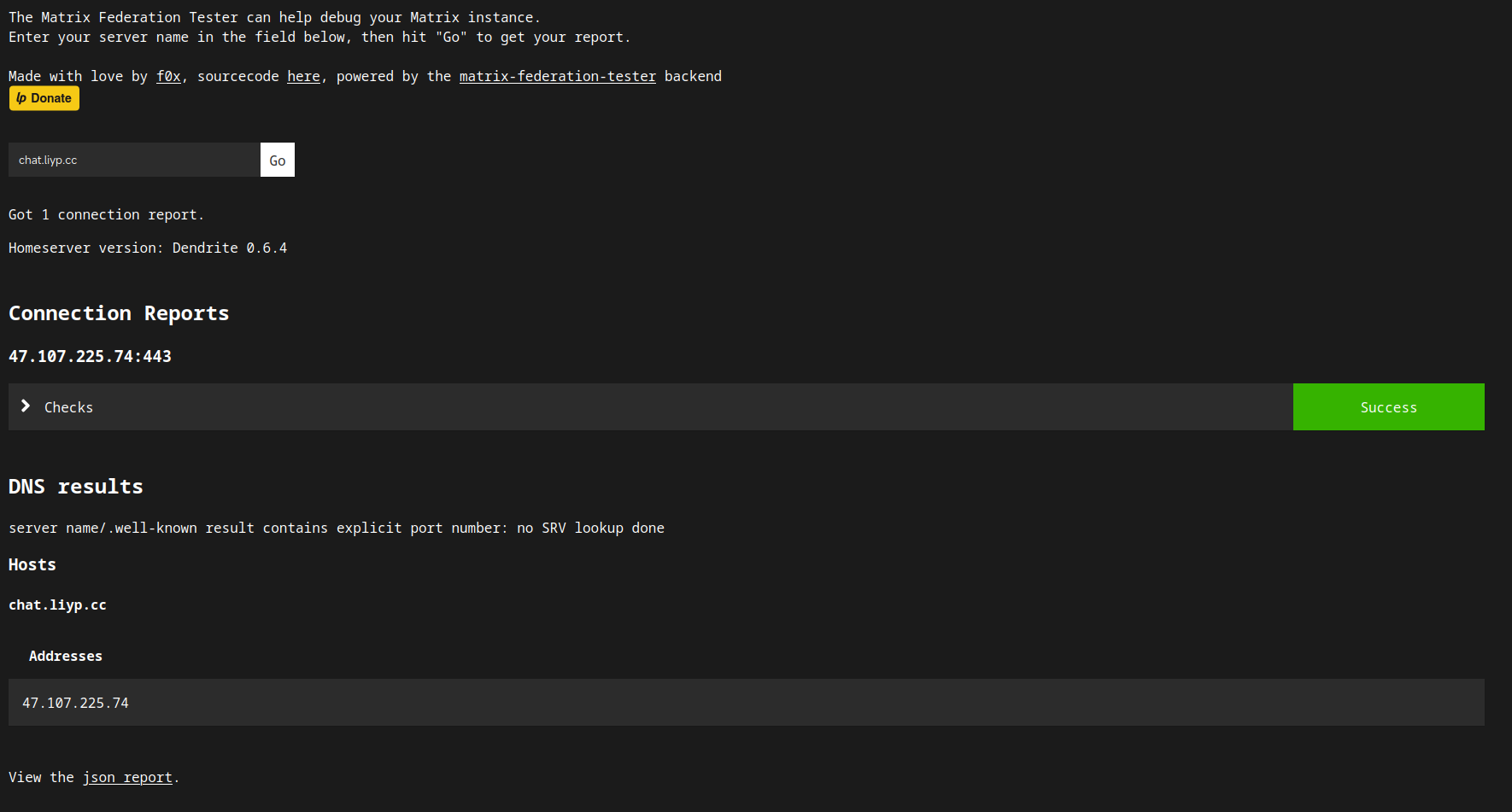
去 https://federationtester.matrix.org/ ↗ 输入自己的的域名(chat.liyp.cc) 测试一下
如果 checks 显示绿色的 Success 就说明成功啦!
祝你好运!你已经可以实现跨服聊天了!
参考链接🔗: